Building an Instant Messenger
Second only to the high pitched sounds of internet connectivity staking claim over your home telephone line were the iconic sounds of xylophones trilling and doors creaking. If you were an internet trailblazer in the late 1990's then more likely than not your Windows machine had some instant messenger installed on it – be it AIM, ICQ, MSN, or Yahoo. For those of you who weren't lucky enough to be born during the best era of the internet, this was the method of communication for any cool kid. We would spend an abundance of time carefully crafting a status message, sometimes hoping it would elicit a message from a crush. Relationships were created, friendships were solidified, and gossip spread like wildfire all through instant messengers. So I decided to rebuild a core childhood memory for the sole reason of experiencing the nostalgia.
Defining the boundaries of what I was going to build was quick. An instant messaging application with the following set of features:
- Create account
- Users profile
- Conversations
It wasn't a daunting list. Those three items mapped neatly to the three frontend views that would be required, as well as how I would partition my backend service. A single Worker to handle authentication and routing, two Durable Object namespaces (one for user, another for conversation), and a D1 database for account credentials.
Talking through the flow of information, the above makes sense. A user creates an account and logs in but we need that information stored centrally to validate their information and create a user session. Then we need to have the frontend sync to a data source that knows about our friends. When we double click to open a conversation with a friend we need to again access a data source that has conversation history. Roughly speaking that is all we need to resurrect our past memories.
Request Routing
Best way to get started is by creating a Cloudflare Worker to handle incoming network requests. There are a couple of requests we can expect and need to route to the correct logic handler.
- /auth/register
- /auth/login
- /user/ws
- /conversation/ws
Four HTTP API endpoints to encapsulate all we are about to do in recreating our instant messaging application.
Authentication
Keeping it simple and true to form for what we're building, all we ask for is a screen name and password on signup and we generate a UUID for a userId value and use crypto functions to secure the password. With an account a user can then login and we will take that username/password combination, run the password through the crypto function and check for a database match on the pair. If we receive a successful result from our D1 database query then we create a JWT where we set our sub value as the userId and respond back to the client with the token.
For any authenticated request a user needs to make, the JWT token will be required to be part of the request where the Durable Objects will be able to deconstruct the token and get the sub value to know which user we're concerned about.
User Service
The single exposed HTTP endpoint defined in our Worker that serves as a passthrough to our user service is the /user/ws route. Before we do any service handoff our Worker will authenticate the request with the JWT token from the request header. If the token is valid we will pass the request to the user Durable Object.
I built both of our services (user and conversation) as Durable Objects with the Cloudflare Actors library, a library I built that provides some helper functionality out of the box. One of those helpers we get for free is WebSocket connections and if you get interested enough in how it works and what functions are triggered when our Durable Object receives a /ws call you should check out:
nameFromRequestconfigurationshouldUpgradeSocket
The response we receive is a socket connection which allows every request hereafter to be communicated through it rather than HTTP requests. All of our logic interactions between our client (browser) and our service are handled in the WebSocket including communicating messages out to other user services. Examples of some of the messages this service supports are:
- Broadcast status change
- Broadcast avatar change
- Manage friend requests
- Block friend
- Get friend list
- Get avatar
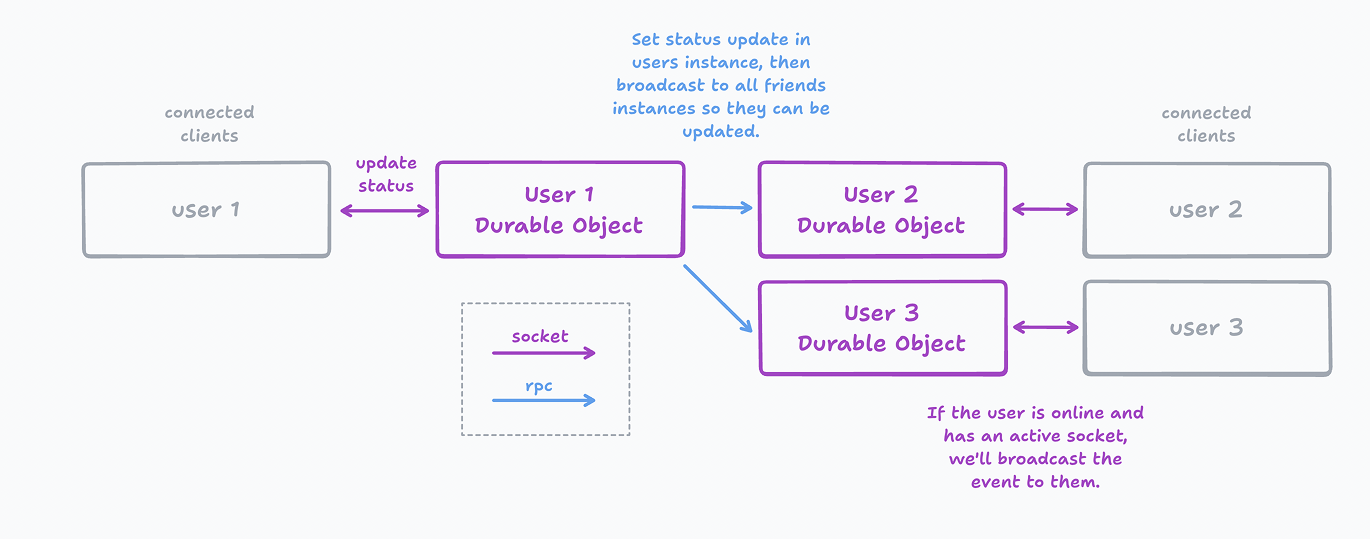
Each of the above handle message flow differently. For example, broadcasting a users status change will first hit the initiating users Durable Object, which in turn that DO will send an RPC message to each online friend so each individuals user DO can send a WebSocket message to their connected client(s).
When we do a request to fetch our friend list all we do is hit our users DO and query the SQLite table for that information. Each user stores their own friends instead of that living in a singular central database. If you were to remove a friend or block a friend then an RPC function call would be made to that friends DO as well to remove you from their list.
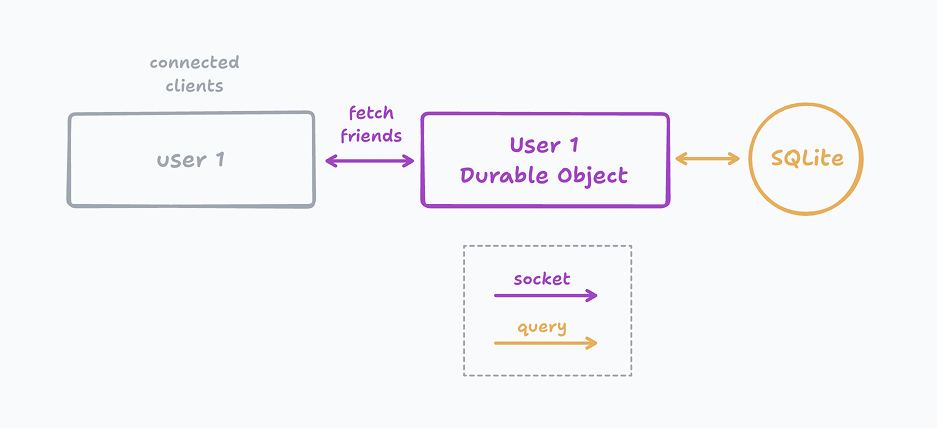
Because we don't use a central database for storing all of this information, in essence it means that each user kind of "owns" their data. Each persons data is isolated in a single instance.
Conversation Service
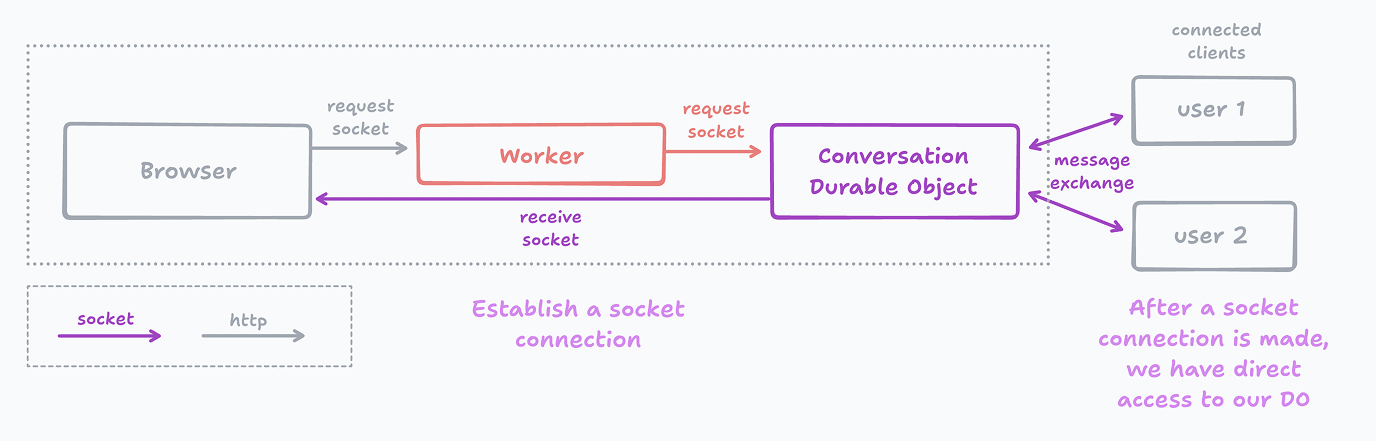
Similar to how each user gets their own individual Durable Object, every conversation also gets its own DO instance. That means that all messages exchanged between two people lives on one instance and can be observed through a single, separate, SQLite database instance.
When we open a conversation window in our frontend that view then establishes a WebSocket connection with this conversation DO, where both users can be simultaneously connected to the same instance. When one user begins typing this allows that user to send a WS message to the DO with a type of user:typing that then allows that DO to signal a message to the other connected user that their friend is typing. Here's an example snippet from the code base on how easy it was to implement:
async onWebSocketMessage(ws: WebSocket, m: any) {
    let message = JSON.parse(m);

    if (message.type === 'message:typing') {
	const payload = {
        type: 'message:typing',
        userId: message.userId,
        isTyping: message.isTyping
    };

	this.sockets.message(JSON.stringify(payload), '*');
    }
}
The types of actions this DO handles for us are:
- Get recent messages
- Send message
- Typing indicators
Literally all this actor cares about is handling the exchange of messages for the two users conversation. Our event lifecycle for this DO looks like the following:
Conclusion
Bringing back my childhood years was too enjoyable. Surprisingly it did not require a lot of code, both in part to the Actors library and the powerful primitives that are Durable Objects.
- 1 Worker
- 2 Durable Objects
- 1 D1 database
Tie those three together and you too can have your own instant messenger service that scales from zero to millions.