Building Vertical Microfrontends
Contributing to a large frontend code base can feel like you’re at the mercy of every other contributor. One team decides to use a specific library that you despise… but now you don’t want to be that jerk that adds a second redundant library for handling network requests. Another team changes a piece of code that indirectly affects some of your pages and you didn’t know until a bug report came in. Today’s release had to be rolled back because another team introduced a regression impacting users so now the release notes you posted online are out of sync with what users will login and see until it’s resolved. Honestly you are at the mercy of every other team in the company that isn’t yours and it is incredibly frustrating.
What if you could develop and release independently as a team without the decisions of other teams weighing on you. You can choose what framework you want (React, Vue, Svelte, or heck… just raw HTML), the libraries you prefer, own your own CI/CD pipeline, and most importantly release your code and own rollbacks when YOU want to. Cut every other team out of the equation altogether.
Buckle up, buckaroo – it’s time for your big break.
Vertical Microfrontends
Traditionally we develop frontend solutions as a singular repository responsible for the breadth of the domain it pertains to. For example, a marketing site or a user dashboard each might be their own individual project. You might imagine for a large company a dashboard code base becoming increasingly large as more products, teams, and contributors are introduced. With such an increase comes complexity – more tests, slower builds, increasingly shared code.
Vertical microfrontends allow you to split the frontend code base into smaller slices mapped by URL paths. An example might be having three code bases under a single domain with varying routes to map to the individual projects:
/      = Marketing
/docs  = Documentation
/dash  = Dashboard
We could take it a step further and focus on just an individual project, too, such as the dashboard. Maybe our dashboard has too many products and individual teams want to have more control of their release cadence so they decide to break it into its own project. Now we have the following:
/dash/product-a
/dash/product-b
Each of the above paths are their own frontend project with zero shared code between them. The product-a and product-b routes map to separately deployed frontend applications that have their own frameworks, libraries, CI/CD pipelines defined and owned by their own teams.
FINALLY.
You can now own your own code from end to end. But now we need to find a way to stitch these separate projects together, and even more so, make them feel as if they are a unified experience.
Unified Experiences
Stitching these individual projects together to make them feel like a unified experience isn’t as difficult as you might think. Matter of fact it’s only a few lines of CSS magic. What we absolutely do not want to happen is to leak our implementation details and internal decisions to our users. If we fail to make this user experience feel as if it were one cohesive frontend then we’ve done a grave injustice to our users. To accomplish this let us take a little trip in understanding how view transitions and document preloading come into play.
View Transitions
When we want to seamlessly navigate between two distinct pages while making it feel smooth to the end user, view transitions make this possible. Defining specific DOM elements on our page to stick around until the next page is visible, and define how any changes are handled, make for quite the powerful quilt-stitching tool to multi-page applications.
There may be, however, instances where making the various vertical microfrontends feel different is more than acceptable. Take for instance if we have our marketing website, documentation, and dashboard each uniquely defined. A user would not expect all three of those to feel cohesive as you navigate between the three parts. But… if you decide to introduce vertical slices to an individual experience such as the dashboard (e.g. /dash/product-a & /dash/product-b) then users should never know they are two different repositories/workers/projects underneath.
Okay enough talk – let’s get to work. I mentioned it was low-effort to make two separate projects feel as if they were one to a user and if you have yet to hear about CSS View Transitions then I’m about to blow your mind. What if I told you that you could make animated transitions between different views (SPA or MPA) feel as if they were one? Before any view transition is in place as we navigate between pages the interstitial loading state would be the white blank screen for some few hundred milliseconds until the full next page began rendering. It would look as if pages were structured like so:
Product A is a React project with a navigation bar and some content. Product B is a Vue project similarly structured with a navigation bar and some content. Through my navigation bar I can toggle between these two projects and when I do I want the navigation bar to stay in place during the load between the two pages – making it feel like a unified SPA.Assuming I have my navigation element wrapped in a <nav> tag all I need to do is define the following on my pages CSS stylesheet and the browsers will handle the rest.
@supports (view-transition-name: none) {
  ::view-transition-old(root),
  ::view-transition-new(root) {
    animation-duration: 0.3s;
    animation-timing-function: ease-in-out;
  }
  nav { view-transition-name: navigation; }
}
Now if we take a look at what page loading between multiple pages should look like, each page will keep the nav element around instead of the white interstitial page making it appear as if the two unrelated pages are in fact a single-page application.
Preloading
Transitioning between two pages makes it look seamless, but we also want it to feel as instant as a client-side hydrated SPA. While currently Firefox and Safari do not support [Speculation Rules], Chrome/Edge/Opera do support the more recent newcomer. The speculation rules API is designed to improve performance for future navigations, particularly for document URL’s which makes multi-page applications (MPA) feel more like single-page applications (SPA).
Breaking it down into code what we need to define is a script rule in a specific format that tells the supporting browsers how to prefetch the other vertical slices that are connected to our web application, likely linked through some shared navigation.
<script type="speculationrules">
  {
    "prefetch": [
      {
        "urls": ["https://product-a.com", "https://product-b.com"],
        "requires": ["anonymous-client-ip-when-cross-origin"],
        "referrer_policy": "no-referrer"
      }
    ]
  }
</script>
Now with that our application prefetches our other microfrontends and holds them in our in-memory cache so if we were to navigate to those pages it would feel nearly instant.
You likely won’t require this for clearly discernible vertical slices (marketing, docs, dashboard) because users would expect a slight load between them. However, highly encouraged to use when vertical slices are defined within a specific visible experience (e.g. within dashboard pages).
Between View Transitions and Speculation Rules we are able to tie together entirely different code repositories to feel as if they were served in a single-page application. Wild if you ask me.
Service Bindings & Rewriting
Now we need a mechanism to host multiple applications, and a method to stitch them together as requests stream in. I understand the definition of biased, but truly there is no better solution than Cloudflare Workers and the vastly distributed edge network closely located to the people of the world. Defining a single Cloudflare Worker as the “Router” allows a single logical point (at the edge) to handle network requests and then forward them to whichever vertical microfrontend is responsible for that URL path. Plus it doesn’t hurt that then we can map a single domain to that router Worker and the rest “just works”.
Service Bindings
If you have yet to explore Cloudflare Worker [service bindings] then it is worth taking a moment to do so. For the lazy, the TLDR is a single Worker can define “service workers” which allows the defining Worker the ability to call into other Workers without going through a publicly-accessible URL. Breaking it down further my Router Worker can call into each vertical microfrontend Worker I have defined (e.g. marketing, docs, dashboard) assuming each of them were Cloudflare Workers.
Why is this important? This is precisely the mechanism that “stitches” these vertical slices together. We’ll dig into how the request routing is handling the traffic split in the next section, but for defining each of these microfrontends we’ll need to update our Router Workers wrangler definition so it knows which frontends it’s allowed to call into.
{
  "$schema": "./node_modules/wrangler/config-schema.json",
  "name": "router",
  "main": "./src/router.js",
  "services": [
    {
      "binding": "HOME",
      "service": "worker_marketing"
    },
    {
      "binding": "DOCS",
      "service": "worker_docs"
    },
    {
      "binding": "DASH",
      "service": "worker_dash"
    },
  ]
}
Our above sample definition is defined in our Router Worker which then tells us that we are permitted to make requests into three separate additional Workers (marketing, docs, and dash). Granting permissions is as simple as that, but let’s tumble into some of the more complex logic with request routing & HTML rewriting network responses.
Request Routing
With knowledge of the various other Workers we are able to call into if needed, now we need some logic in place to know where to direct network requests when. Naturally with our Router Worker being the one assigned our custom domain all requests will come through it, and at the network edge it will determine which Worker to forward the request to and return the response from.
First thing we need to do is map URL paths to associated Workers. When a certain request URL is received we need to know where it needs to be forwarded to so we do this by defining rules. While we support wildcard routes, dynamic paths, and parameter constraints, we are going to keep focus on the basics – literal path prefixes – it makes the point stick easier. We have three microfrontends in this example:
/      = Marketing
/docs  = Documentation
/dash  = Dashboard
Each of the above paths need to be mapped to an actual Worker (reference our wrangler definition for services in the section above). For our Router Worker we define an additional variable with the following data so we can know which paths should map to which service bindings. We now know where to route users as requests come in! Define a wrangler variable with the name ROUTES and the following contents:
{
  "routes":[
    {"binding": "HOME", "path": "/"},
    {"binding": "DOCS", "path": "/docs"},
    {"binding": "DASH", "path": "/dash"}
  ]
}
Diving into an example let’s envision a user visits our website path /docs/installation. Under the hood what happens is the request first reaches our Router Worker which is in charge for understanding what URL paths map to which individual, separate, Workers. It understands that the /docs path prefix is mapped to our DOCS service binding which referencing our wrangler file points us at our worker_docs project. Our Router Worker, knowing that /docs is defined as a vertical microfrontend route, removes the /docs prefix from the path and forwards the request to our worker_docs Worker to handle the request and then finally returns whatever response we get.
Why does it drop the /docs path, though? This was an implementation detail choice I made so that when the Worker is accessed via our Router Worker then it can clean up the URL to handle the request as if it were called from outside of our Router Worker. Like any Cloudflare Worker, our worker_docs service might have its own individual URL where it can be accessed from. I decided I wanted that service URL to continue to work independently, and when it’s attached to our new Router Worker I would automatically handle removing the prefix so the service could be accessible from its own defined URL or through our Router Worker… either place, doesn’t matter.
HTMLRewriter
Splitting our various frontend services with URL paths (e.g. /docs or /dash) makes it easy for us to forward a request, but when our response contains HTML that doesn’t know it’s being reverse proxied through a path component… well that causes problems. Take for example when our documentation website has an image tag in the response <img src="./logo.png" />. If our user was visiting this page at https://website.com/docs/ then loading the logo.png file would likely fail because our /docs path is somewhat artificially defined only by our Router Worker.
Only when our services are accessed through our Router Worker do we need to do some HTML rewriting of absolute paths so our returned browser response references valid assets. In practice what happens is when a request passes through our Router Worker, we pass the request to the correct Service Binding and we receive the response from that. Before we pass that back to the client we have an opportunity to rewrite the DOM so what we do is where we see absolute paths we go ahead and prepend that with the proxied path. Where previously our HTML was returning our image tag with <img src="./logo.png" /> we now modify it before returning to the client browser to <img src="./docs/logo.png" />.
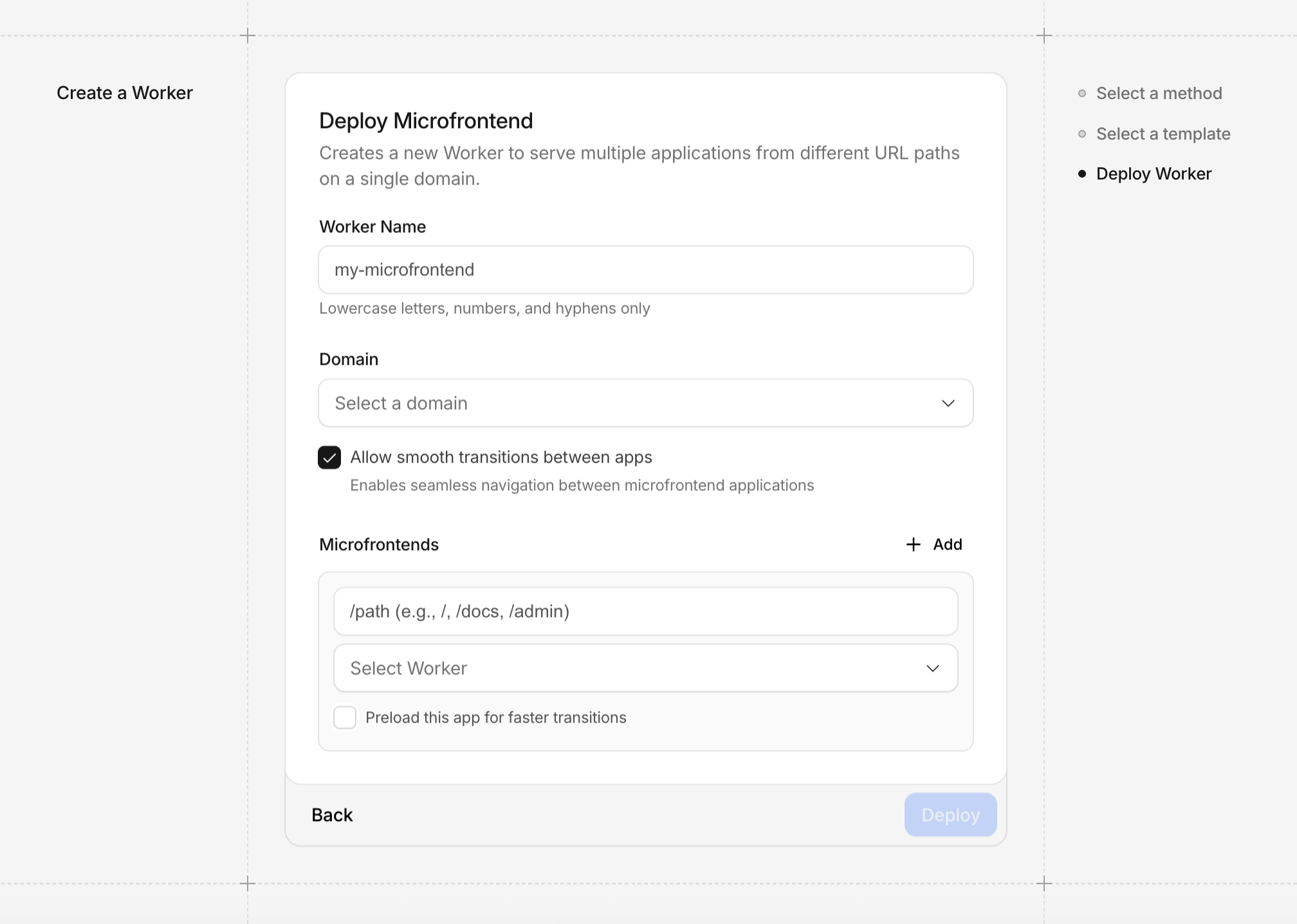
Now, revisiting an earlier section where we talked about CSS view transitions and document preloading and how they gave us the ability to stitch multi-page applications together to make them seem as if they were single-page applications. We could of course manually place that code into our projects and have it work but this Router Worker will automatically handle that logic for us by also using HTMLRewriter. Without diving into the boring details, in your Router Worker ROUTES variable if you set smoothTransitions to true at the root level then the CSS transition views code will automatically be added. Additionally, if you set the preload key within a route to true then the script code speculation rules for that route will automatically be added as well. Below is an example of both in action:
{
  "smoothTransitions":true,
  "routes":[
    {"binding": "APP1", "path": "/app1", "preload": true},
    {"binding": "APP2", "path": "/app2", "preload": true}
  ]
}